How to use the converter
Paste a ChatGPT response containing math, get a Google Doc with the math properly rendered.
Steps
- Prompt ChatGPT for the content you want. Math comes out cleaner when
you tell the model to wrap inline math in
$ ... $and display math in$$ ... $$— see the sample prompt below. -
Click ChatGPT's "Copy markdown" button on the response.
Do not drag-select the rendered output — the LaTeX
delimiters get stripped and the converter will fail.
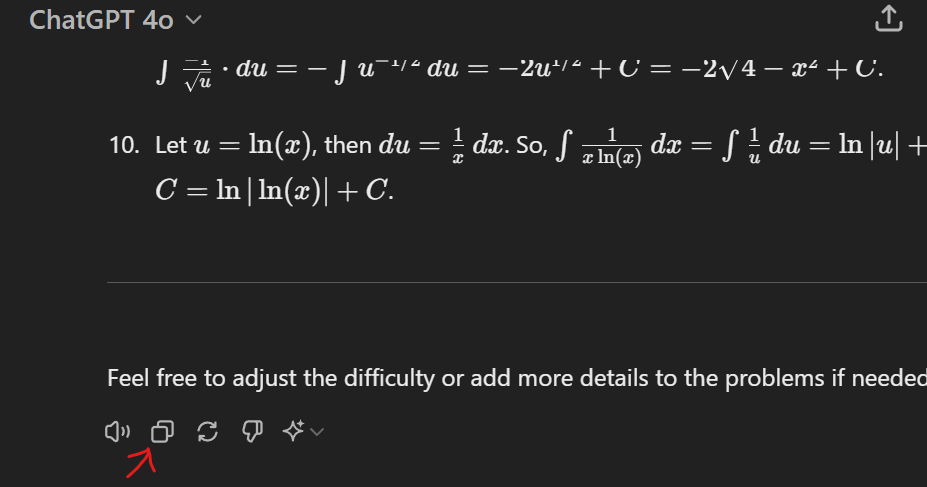
- Enter the email address of the Google account you're currently signed into in this browser, and paste the markdown into the textarea on the home page. (If you enter a different email, you'll land on Google's "Request access" page after submitting — the doc gets shared with whichever address you typed, not your signed-in account.)
- Submit. You'll be redirected to the Google Doc immediately — this is the only delivery channel that works. Drive's share-notification emails get silently filtered for service-account shares; don't wait for one.
- Once on the doc: you have full edit access. To put a copy in your own Drive (so it survives even if this app's underlying service account is rotated), use File → Make A Copy. The copy you make is owned by you and counts against your personal Drive quota only.
Background: the converter uses a Google service account to create the doc. The SA owns the original until you make a copy. Sharing is always with the email you specify — there are no public anyone-with-link URLs.
Suggested ChatGPT prompt
To maximize the chance every equation renders cleanly, prepend your prompt with:
Write every mathematical expression in LaTeX. Use inline math for short expressions by wrapping them in$ ... $and display math for multi-line work by wrapping it in$$ ... $$. Do not mix LaTeX with plain text numbers, and escape currency values with\$.
About
Proof-of-concept tool that converts ChatGPT-style markdown (with LaTeX math) into a downloadable Google Doc. No accounts, no persistence — paste, submit, get a link.